Why Microphone Choice Makes or Breaks Your Event Audio
Picking the wrong microphone type is a fixable mistake at corporate events. A panel moderator who needs both hands free ends up gripping a handheld mic. A keynote speaker who wants to walk the stage gets stuck tethered to a podium mic. A CEO doing a Q&A juggles a handheld and notes when a worn mic would have left both hands free.
Each wireless mic format, handheld, lavalier, and headset, solves a different problem. None of them is universally "better." The right choice depends on how much the presenter moves, whether their hands need to be free, how formal the event is, and how many speakers need to be mic'd at once. Get this wrong and you'll hear it in the recording: muffled audio from a lavalier rubbing against a lanyard, popping consonants from a handheld held too close, or a headset mic picking up breathing sounds because it wasn't positioned right.
This guide breaks down the three formats side by side, covering sound quality, mobility and setup for Bay Area events, from small panel discussions to large conferences. We'll also cover the planning points that are easy to overlook: battery life across a full conference day, RF interference in dense venues, and why every extra wireless channel needs frequency planning.
Handheld Wireless Microphones: Best for Panels and Q&A
A handheld wireless mic is a familiar option and the easiest to hand off between speakers, which is why it is a common choice for panel discussions and audience Q&A. There's no clip-on setup, no earpiece fitting, no lapel routing. Someone picks it up, talks, and passes it to the next person or an usher runs it into the audience for questions.
The tradeoff is that a handheld occupies one hand, and sound quality depends on how the speaker holds it. Held too far from the mouth, the mic sounds thin and distant. Held very close, plosives ("p" and "b" sounds) can pop; Shure notes that quality vocal mics should have a pop filter, usually internal, to control plosives, but technique still matters. A good AV tech will brief speakers on mic distance and angle before the event starts.
Handhelds also work best for shorter speaking segments. A moderator running a 45-minute panel discussion, switching a handheld between four panelists, works fine. A keynote speaker giving a long solo talk with slides may prefer a worn mic, since a handheld leaves only one hand for gesturing, notes and a slide clicker.
- Good fit for: panel discussions, audience Q&A, award presentations, short remarks
For panel-heavy events, check our speaker AV coordination checklist to make sure every panelist's mic needs are confirmed before doors open.
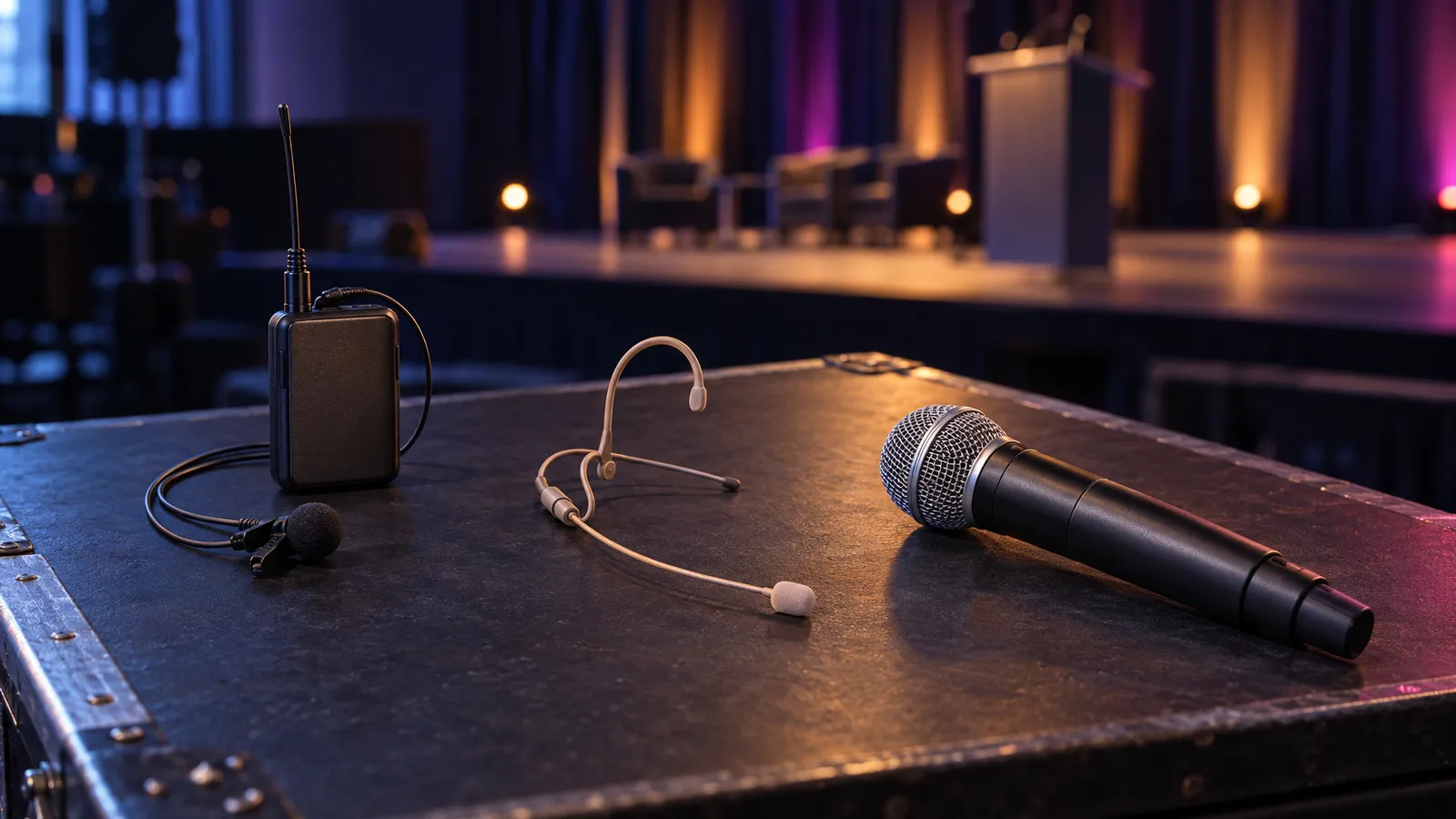
Handheld mics are easy to pass between panelists but occupy one of the speaker's hands. Photo by Bogomil Mihaylov on Unsplash.
Lavalier Mics: Best for Formal Presentations and Interviews
A lavalier ("lav") mic is the small clip-on microphone you've seen on newscasters and conference keynote speakers, usually attached to a lapel, collar, or tie below the chin. It keeps both hands free, which suits presenters who need to click through slides, gesture, or hold notes while speaking. Shure's guide for meetings and conferences notes that one advantage of worn mics is "the ability to maintain a consistent distance between the presenter and the microphone."
Lavaliers come in wired and wireless versions. A wired lav runs a cable to the sound system, which keeps the presenter within reach of it; a wireless lav has a short lead to a bodypack transmitter worn on a belt or waistband, which lets the presenter move freely. Either way, placement matters: clothing, a lanyard or a scarf rubbing against the mic or its cable can be heard, so clip it where nothing brushes against it and check during the sound check.
Lavs are a common pick for keynote speakers, corporate trainers, panel moderators who need a free hand for notes, and one-on-one interviews or fireside chats. They can be less suited to a highly physical presentation, since a lav can shift position if a speaker moves around a lot, and a bodypack needs somewhere to go on the outfit — worth raising with speakers in advance, especially if they plan to wear a dress or a fitted suit.
- Good fit for: keynote speeches, presentations with slides, training sessions, one-on-one interviews
Need the full room wired up around your speaker's mic? Our AV equipment catalog covers matching PA and display packages by room size.
Headset Mics: Best for High-Movement Presentations
A headset mic wraps around the ear or over the head with a thin boom positioned right at the corner of the mouth. It suits anyone who moves a lot on stage: fitness instructors, high-energy keynote speakers, product demo presenters walking a showroom floor, or anyone doing physical demonstrations while talking.
Because the capsule is held near the mouth and moves with the head, a well-fitted headset keeps the distance to the mouth more consistent than a lavalier when the speaker turns their head, and there is no holding technique to worry about as with a handheld. Fit still matters: a headset can shift if it is loose, so have the technician fit it and check it at the sound check. For a presenter who will be pacing, gesturing broadly or doing physical demonstrations, a headset is often a good choice.
The main drawback is visibility and comfort. A headset sits on the presenter's face, which some find out of place in a formal boardroom but is common at product launches, fitness demos and keynotes with stage production. Shure notes that "some individuals are uncomfortable or may be distracted by headworn or lavalier mics," and some speakers find the ear-hook uncomfortable over a long session, so it's worth checking in with the presenter at a break to reposition or briefly remove it.
- Good fit for: product demos, fitness or movement-based presentations, high-energy keynotes, trade show booths

A headset holds the capsule near the mouth; a good fit keeps it there as the presenter moves. Illustration.
RF Interference and Multi-Channel Events: What Bay Area Planners Need to Know
The more wireless mics running at one event, the more careful the frequency planning needs to be. Each wireless mic channel operates on its own frequency within its system's band. Shure's guide explains that each wireless system "must operate on a unique, interference-free channel," that "the more systems that are in simultaneous use, the more challenging that becomes," and that wireless frequencies can interact with each other and create audio artifacts. Other transmitters in the same band — another event's mics next door, for example — can also interfere. That is why larger mic counts need a coordinated frequency plan.
Each mic needs its own receiver channel, and how many channels fit cleanly in one room depends on the frequency band and how much other RF traffic is in the building. In the US, the FCC permits wireless microphones in the TV bands and several other bands, some on a licensed basis and some unlicensed, and the unlicensed spectrum is shared with other devices. A large mic count (a 12-panelist conference with individual lavs, for example) needs a coordinated frequency plan built in advance, not assembled the morning of the event. A frequency scan of the actual venue helps, since RF conditions vary building to building and even floor to floor.
Battery life is the other planning point. Check the rated runtime of the transmitters you rent against your schedule: a full-day conference with an early AV check and an evening closing session can outlast a single set of batteries or a charge. Swapping batteries at a natural break like lunch is cheaper than a mic cutting out during an afternoon keynote.
For a full breakdown of how mic systems fit into a complete room setup, see our sound system setup guide.
Which Wireless Mic Should You Book? Quick Decision Guide
If you're still not sure which format fits your event, here's a quick shortcut:
- Multiple speakers, short segments, passing the mic around: handheld. It's easy to hand off and needs no fitting.
- One speaker, slides, needs both hands free, formal tone: lavalier. It is small and can be placed discreetly; check it for clothing noise at the sound check.
- High movement, physical demo, fitness, or trade show floor: headset, fitted properly so it stays in position as the presenter moves.
- Mixed event (panel plus a keynote plus audience Q&A): book a combination. For example, two or three handhelds for Q&A plus one lav or headset for the main presenter.
Whatever format you land on, ask for a backup mic and spare batteries for long sessions. On the VENEGEEST side, the published catalog lists two microphones as part of the Bluetooth Speaker System (spec details on request), and standalone handheld, lavalier and headset wireless mics are available on request, subject to availability; contact us for a quote. For small rooms, our Bluetooth Speaker System ($60 per day: one controller, six speakers and two mics) is the simplest option; for larger rooms, pair mics with Commercial PA Speakers ($200 per day each).
FAQ: Wireless mics for events
What's the difference between a lavalier and a headset mic?
A lavalier clips to a lapel or collar below the chin, while a headset mic sits on a boom arm right at the corner of the mouth. A well-fitted headset keeps the distance to the mouth more consistent when the speaker moves, while a lav is less visible and often suits formal, lower-movement presentations.
Can I mix microphone types at one event?
Yes. A setup might pair a lavalier or headset for the main presenter with 2-4 handheld mics on standby for panel discussions or audience Q&A. Each mic runs on its own receiver channel, and the frequencies need to be coordinated so they don't interfere with each other.
How many wireless mics can run at the same event without interference?
There's no single number: each mic needs its own receiver channel, and how many coexist cleanly depends on the frequency band, the equipment and how much other RF activity (other wireless systems, other exhibitors) is in the venue. For larger mic counts, request a frequency scan and coordination plan in advance, not day-of.
Does VENEGEEST rent wireless microphones?
Yes, on request. Our published catalog lists the Bluetooth Speaker System ($60 per day) with one controller, six speakers and two mics. Standalone wireless microphones, lavaliers and headsets are available on request, subject to availability, so if you need more mics or a specific format, contact us for a quote. Delivery, setup and technician services are scoped and quoted to your event.
Do wireless mics need new batteries during a full-day event?
Often, yes. Check the rated runtime of the specific transmitters against your schedule, and for a long day swap batteries at a natural break like lunch rather than risk a mic cutting out mid-session.
Is a lapel mic the same as a lavalier mic?
Yes. Shure's guide describes lavalier mics as "also known as lapel mics": a small microphone usually attached directly to clothing, such as a lapel, collar or tie. A lavalier can be wired to the sound system or connected by a short lead to a wireless bodypack transmitter. The choice that actually matters is lavalier versus headset: the lav is less visible and often suits formal, lower-movement talks; a well-fitted headset tends to hold a steadier level when the speaker moves.
Handheld mic vs headset: which is better for a presentation?
For a solo presenter with slides who walks the stage, a headset (or a lavalier if the setting is formal) keeps both hands free and helps keep the level consistent. Handhelds suit panels, award presentations and audience Q&A, where the mic changes hands and nobody needs to be fitted. Mixed events often pair two or three handhelds for Q&A with one lav or headset for the main speaker.